

Download Sidify Music Converter – Spotify to MP3, FLAC, Offline Playback
Overview
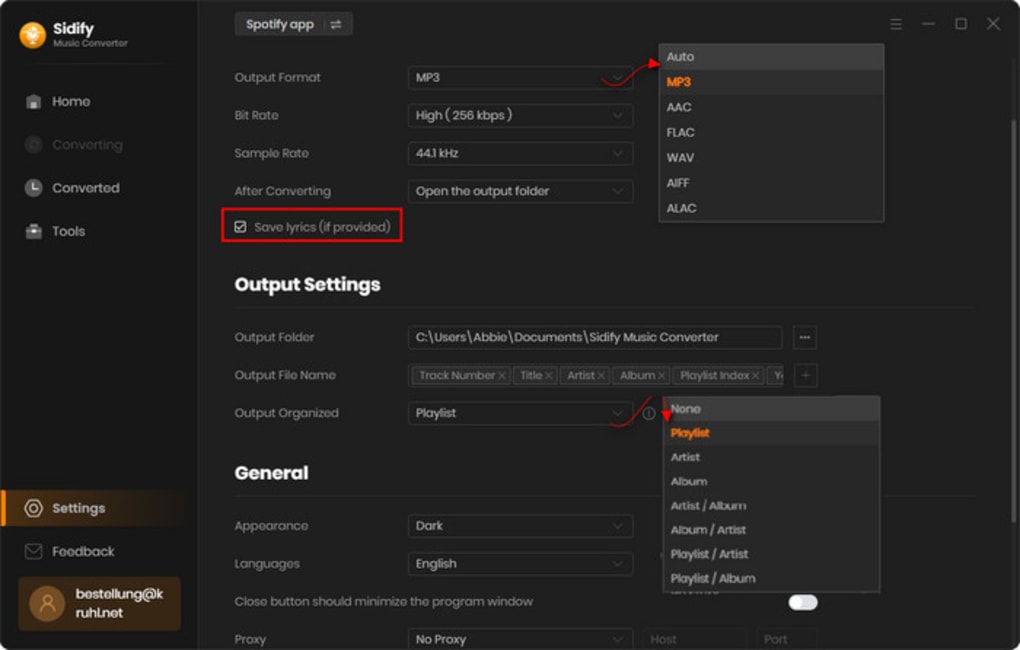
Sidify Music Converter is a dedicated Spotify‑to‑audio‑file tool that lets you transform streaming tracks, playlists, albums, and even radio stations into high‑quality, royalty‑free files. By supporting popular formats such as MP3, AAC, WAV, FLAC, AIFF, and ALAC, Sidify gives you the flexibility to build a personal music library that works on any device—whether it’s a Windows PC, mac‑OS laptop, Android phone, or iOS tablet. The software is designed with a clean, user‑friendly interface, making the conversion process as simple as dragging a playlist into the program and clicking “Convert.” While it maintains the original audio fidelity, Sidify also preserves essential metadata, including ID3 tags, album art, and synchronized lyrics, so your converted collection stays organized and searchable.
Speed is another highlight; Sidify boasts a conversion engine that works up to ten times faster than many competitors, meaning large libraries can be processed in minutes rather than hours. For collectors who still cherish physical media, Sidify includes a “Spotify to CD” burning feature, allowing you to create custom audio CDs directly from your favorite streaming selections. Though it cannot bypass heavily DRM‑protected tracks, the tool handles the vast majority of Spotify’s catalog without issue, providing a reliable solution for offline listening, backup, and cross‑platform music management.
Key Features & Installation Guide
Core Feature List
- Convert Spotify songs, playlists, albums, and radio to MP3, AAC, WAV, FLAC, AIFF, or ALAC.
- Preserve original ID3 tags, album art, and synced lyrics during conversion.
- 10× faster conversion speed thanks to a multi‑threaded engine.
- Batch conversion for large libraries—process hundreds of tracks in one click.
- Spotify‑to‑CD burning for creating custom audio CDs.
- Supports local audio file conversion to the same range of formats.
- Multi‑language interface (up to 46 languages) for global users.
- Automatic updates ensure you always have the latest Spotify API compatibility.
- Secure, ad‑free experience with no hidden background services.
- Cross‑platform compatibility: Windows 10/11, macOS 10.14‑13, Linux (via Wine), Android 8+, iOS 12+ (via sideloaded app).
Installation & First‑Time Use
Getting Sidify Music Converter up and running is straightforward. Download the installer from the official Sidify website, selecting the version that matches your operating system. For Windows users, run the .exe file; macOS users will open the .dmg package and drag the app to the Applications folder.
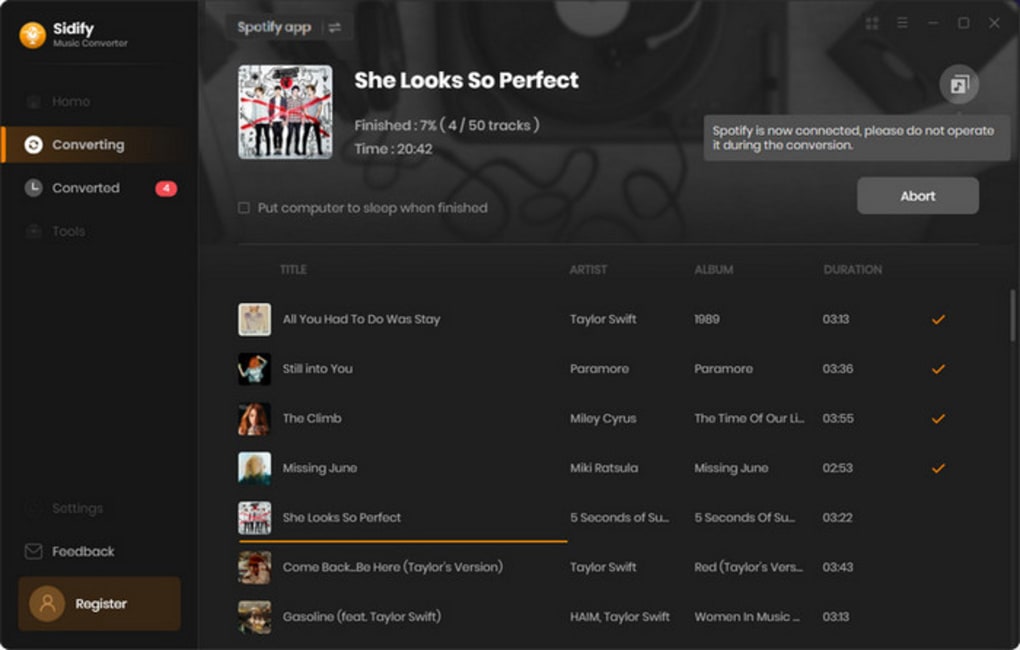
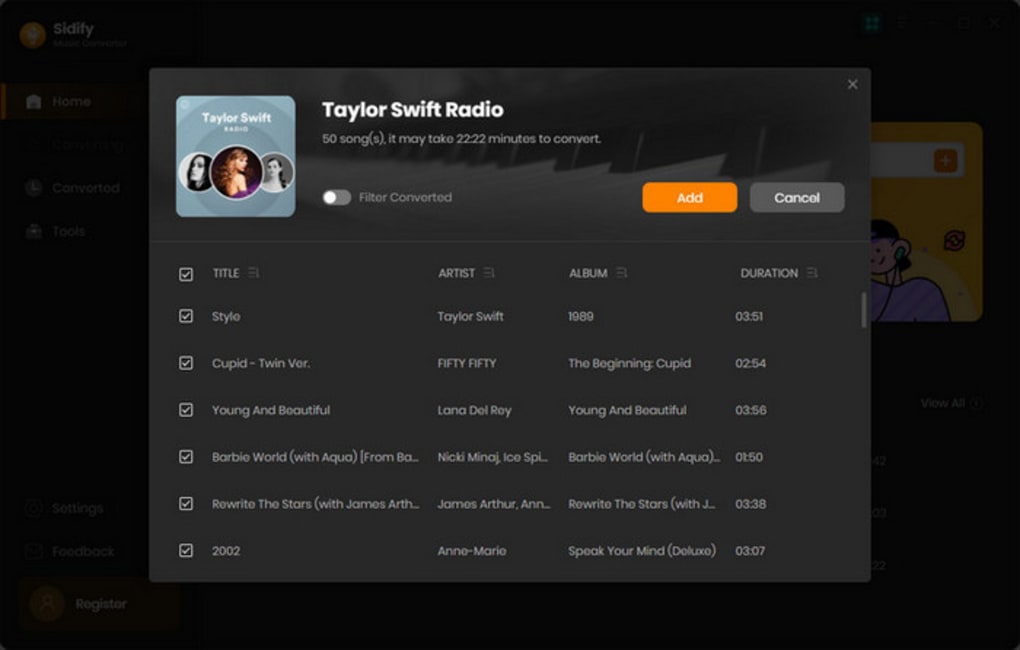
Once installed, launch the program and sign in with your Spotify credentials—this step is required to access the streaming library. After logging in, you’ll see a familiar Spotify‑style layout where you can drag playlists or individual tracks into the conversion window. Choose your desired output format from the drop‑down menu, set the output folder, and click “Convert.” The progress bar will show real‑time status, and completed files appear in the destination folder ready for offline playback.
For CD burning, select the “Burn to CD” tab, add the converted tracks, and follow the on‑screen prompts to finalize the disc. Sidify also offers a portable version for advanced users who prefer a no‑install option; simply unzip the portable package and run the executable.
Compatibility Details
Sidify Music Converter runs on the following operating systems:
- Windows 10, Windows 11 (64‑bit)
- macOS 10.14 (Mojave) through macOS 13 (Ventura)
- Linux distributions via Wine (recommended for Ubuntu, Fedora, and Debian)
- Android 8.0+ (requires sideloading of the APK)
- iOS 12+ (requires enterprise provisioning for sideloaded builds)
All versions receive automatic updates that keep the software compatible with the latest Spotify API changes, ensuring a stable and secure conversion experience.
Pros, Cons & Frequently Asked Questions
Pros
- High‑fidelity conversion preserving original audio quality.
- Lightning‑fast batch processing saves time.
- Comprehensive format support covers both lossy and lossless needs.
- Metadata and lyric retention keeps your library organized.
- User‑friendly UI suitable for beginners and power users alike.
- CD burning feature adds a nostalgic yet practical option.
- Regular updates maintain compatibility with Spotify’s evolving DRM.
Cons
- Cannot convert tracks protected by heavy DRM (rare but possible).
- Premium license required for unlimited conversions; free trial limits conversions per session.
- Linux support relies on Wine, which may add an extra setup step for some users.
- No built‑in cloud backup; users must manage their own storage.
FAQ
Can I convert Spotify playlists without a Premium account?
Sidify requires a Spotify Premium subscription to access full track URLs. Free accounts can only convert a limited number of songs per session, and many features (like batch conversion) are disabled.
Is the converted audio DRM‑free?
Yes. Once a track is successfully converted, the output file contains no DRM and can be played on any device that supports the chosen format.
How does Sidify preserve my metadata?
During conversion, Sidify reads the original ID3 tags, album artwork, and embedded lyrics from Spotify’s metadata stream and writes them directly into the new file, ensuring your music library stays organized.
Can I burn a converted playlist directly to a CD?
Absolutely. The “Burn to CD” tab lets you select any converted tracks, arrange their order, and create an audio CD in a few clicks. The process works on both Windows and macOS.
Is my Spotify login information safe?
Sidify uses encrypted HTTPS connections to communicate with Spotify’s servers. Your credentials are never stored locally; they are only used for the duration of the session.
Sidify Music Converter delivers exactly what Spotify power users need—a fast, reliable way to keep their favorite tracks offline without sacrificing quality. The UI is intuitive, the conversion speed is impressive, and the added CD‑burning capability gives it a unique edge over generic audio converters.
Conclusion & Call to Action
For anyone who spends hours curating playlists on Spotify and wants those songs available on any device—whether you’re traveling, hitting the gym, or preserving a collection for future listening—Sidify Music Converter offers a polished, secure, and feature‑rich solution. Its ability to retain high‑resolution audio, preserve metadata, and process large libraries in record time makes it a standout choice among Spotify conversion tools. While the need for a Premium subscription and the inability to crack heavily DRM‑locked tracks are minor trade‑offs, the overall value—especially with the CD‑burning function—far outweighs these limitations. Ready to take control of your Spotify library? Download Sidify Music Converter now, enjoy a free trial, and experience seamless offline playback across Windows, macOS, Android, and iOS.







